【jinba.flow】SlackからGithubに投稿を行う
SlackからGithubに投稿を行うというワークフローを紹介
jinba.flowとjinba.appについて
Carnotでは、jinba.flowとjinba.appという2つのツールを開発しています。
jinba.flowは、簡単な指示やノーコード操作で、データ変換、分析、AI活用、外部サービスとの連携など、日々の業務を自動化できるワークフロー作成ツールです。SlackやGmail、Googleスプレッドシートなどと自由に連携し、「面倒だけど人がやっていた作業」をスマートに置き換える仕組みを作ることが可能です。
jinba.appは、自然言語によるチャットだけで、エージェントがMCPを組み合わせてタスクを処理してくれるツールです。ワークフローの生成が発生しないため、コードを書いたことがなくても、エンジニアリング技術・知識がなくても、誰でも・簡単に・タスクを処理することができ、より多くの人にお使いいただけます。
SlackからGithubに投稿を行うワークフロー
今回はjinba.flowのテンプレートとして、SlackからGithubに投稿を行うというワークフローを紹介します。
このワークフローでは、Slack botへのアクセス権を持っている人であれば(その人が該当リポジトリのメンバーでない場合でも)が、バグを迅速に報告し、GitHubに追加できるようにすることを目的としています。
0.事前準備
このワークフローを実行するためには、①Slackアカウントとの連携②Githubアカウントとの連携が必要になります。
また、このワークフローはテンプレートからの読み込みを行なっていただく必要があります。
テンプレートのインポート方法については前回の記事で紹介しておりますので、こちらをご参考ください。
テンプレートはこちら
- id: slack_event
name: slack_event
tool: INPUT_SLACK_EVENT
config: []
input:
- name: value
value: |
{ "type": "app_mention", "text": "@slack_bot #bug #web repo:flow title:Pressing X button crashes site desc:When I press the X button on the homepage, the entire site crashes and I have to refresh.", "ts": "1736908626.0", "channel": "C089XSKQ2QG", "event_ts": "1735886205.0"
}
- id: process_message
name: process_message
tool: PYTHON_SANDBOX_RUN
config: []
input:
- name: code
value: | import re import json # Get the message text and full event
message = steps.slack_event.result.text
full_event = steps.slack_event.result # Initialize logging
logs = [] logs.append(f"Received message: {message}") logs.append(f"Full event type: {type(full_event)}") logs.append(f"Full event keys: {list(full_event.keys()) if isinstance(full_event, dict) else 'Not a dict'}") # Initialize result variable result = None # Check if it's a help request if "!help" in message: logs.append("Help request detected")
result = { "is_valid": False, "is_help": True, "message": "Valid labels: #bug, #web, #copilot, #tools, #enhancement\nFormat: @slack_bot #label1 #label2 repo:flow|app title:Your issue title desc:Detailed description", "logs": logs
} else: # Extract all labels from the message label_pattern = r'#(\w+)'
labels = re.findall(label_pattern, message) logs.append(f"Found labels: {labels}") # Check for valid format: <@USER_ID> #labels repo:type title:title desc:description # The actual message format from Slack includes <@USER_ID> instead of @slack_bot pattern = r'<@[A-Z0-9]+>\s+(?:#\w+\s+)*repo:(\w+)\s+title:(.*?)\s+desc:(.*)'
match = re.search(pattern, message, re.DOTALL) logs.append(f"Regex match: {bool(match)}")
# If no match, try alternative pattern without the <@ format (for testing) if not match: alt_pattern = r'@slack_bot\s+(?:#\w+\s+)*repo:(\w+)\s+title:(.*?)\s+desc:(.*)'
match = re.search(alt_pattern, message, re.DOTALL) logs.append(f"Alternative regex match: {bool(match)}") if match and labels: repo_type = match.group(1).lower() title = match.group(2).strip() description = match.group(3).strip() logs.append(f"Parsed repo_type: {repo_type}") logs.append(f"Parsed title: {title}") logs.append(f"Parsed description: {description}")
valid_labels = ['bug', 'web', 'copilot', 'tools', 'enhancement'] valid_repos = {'flow': 'jinbaflow', 'app': 'lopeai'}
# Filter out invalid labels valid_issue_labels = [label for label in labels if label.lower() in valid_labels] logs.append(f"Valid labels: {valid_issue_labels}")
# Check if title and description exist and are not empty if not title or not description: logs.append("Title or description is empty")
result = { "is_valid": False, "is_help": False, "message": "Both title and description are required. Ping me with !help for instructions."
} elif valid_issue_labels and repo_type in valid_repos: # Create a formatted label string for the title
result = { "is_valid": True, "labels": valid_issue_labels, "repo": valid_repos[repo_type], "title": title, "description": description, "issue_title": f"{title}", "logs": logs
} else: logs.append("Invalid labels or repo type")
result = { "is_valid": False, "is_help": False, "message": "Invalid format. Make sure to include valid labels, repo:flow or repo:app, a title, and a description. Ping me with !help for instructions.", "logs": logs
} else: # If we get here, format is invalid logs.append("Format is invalid - regex didn't match or no labels found")
result = { "is_valid": False, "is_help": False, "message": "Invalid format. Make sure to include valid labels, repo:flow or repo:app, a title, and a description. Ping me with !help for instructions.", "logs": logs
} # The last expression is automatically returned
result
- name: data_type
value: OBJECT
needs:
- slack_event
- id: create_issue
name: create_issue when: "{{steps.process_message.result.data.is_valid}} == true"
tool: GITHUB_CREATE_AN_ISSUE
config:
- name: token value: "{{ secrets.JINBA_SLACK_PAT.value }}"
input:
- name: owner
value: carnot-tech
- name: repository value: "{{steps.process_message.result.data.repo}}"
- name: title value: "{{steps.process_message.result.data.title}}"
- name: labels value: "{{steps.process_message.result.data.labels | dump}}"
- name: body
value: |-
{{steps.process_message.result.data.description}}
*Reported via Slack*
needs:
- process_message
- id: send_success_response
name: send_success_response when: "{{steps.process_message.result.data.is_valid}} == true"
tool: SLACK_POST_MESSAGE
config:
- name: token value: "{{ secrets.SLACK_GITHUB_SENDER.token }}"
input:
- name: channel value: "{{steps.slack_event.result.channel}}"
- name: thread_ts value: "{{steps.slack_event.result.ts}}"
- name: text value: "Issue created successfully! View it here: {{steps.create_issue.result.html_url}}"
needs:
- create_issue
- id: send_help_response
name: send_help_response when: "{{steps.process_message.result.data.is_valid}} == false && {{steps.process_message.result.data.is_help}} == true"
tool: SLACK_POST_MESSAGE
config:
- name: token value: "{{ secrets.SLACK_GITHUB_SENDER.token }}"
input:
- name: channel value: "{{steps.slack_event.result.channel}}"
- name: thread_ts value: "{{steps.slack_event.result.ts}}"
- name: text value: "{{steps.process_message.result.data.message}}"
needs:
- process_message
- id: send_error_response
name: send_error_response when: "{{steps.process_message.result.data.is_valid}} == false && {{steps.process_message.result.data.is_help}} == false"
tool: SLACK_POST_MESSAGE
config:
- name: token value: "{{ secrets.SLACK_GITHUB_SENDER.token }}"
input:
- name: channel value: "{{steps.slack_event.result.channel}}"
- name: thread_ts value: "{{steps.slack_event.result.ts}}"
- name: text value: "{{steps.process_message.result.data.message}}"
needs: - process_message
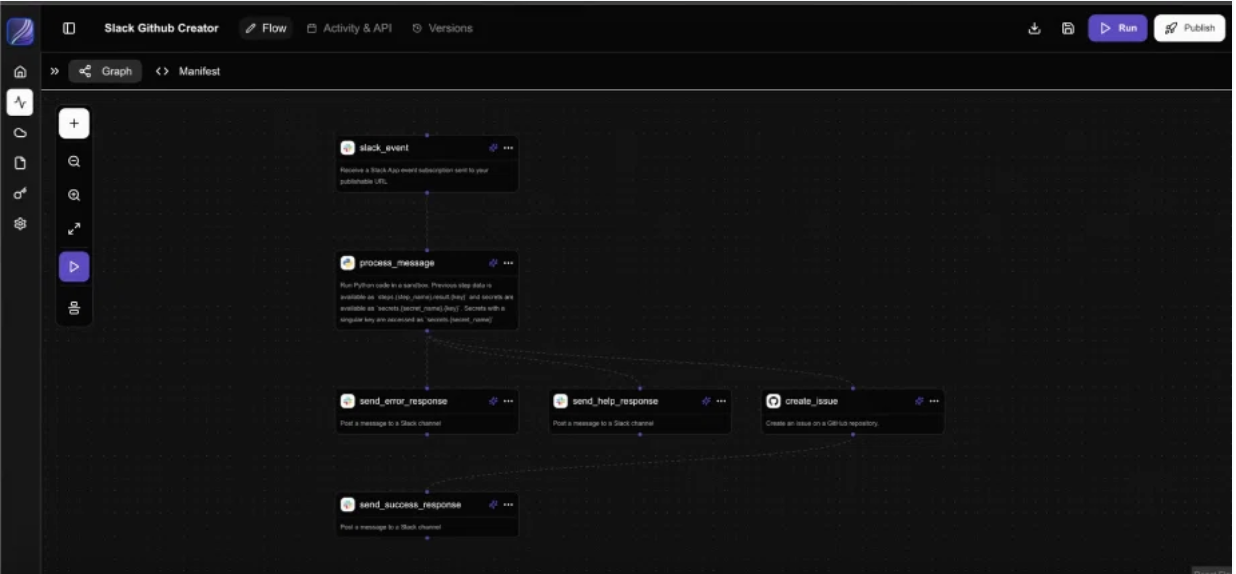
1. テンプレートをインストールする。
上記のテンプレートをインストールすると、上記のような画面になります。
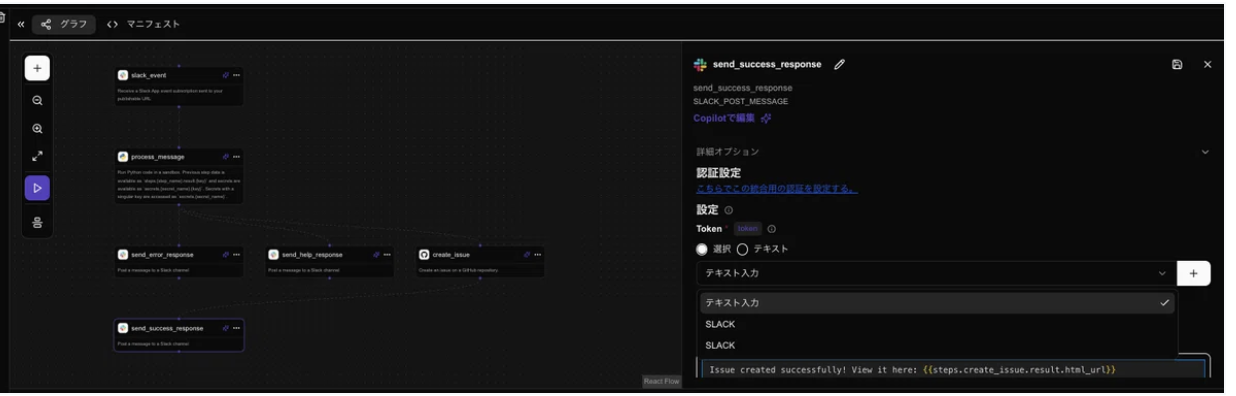
この画面内で各モジュールをクリックすると、ツールとの連携が行えますので、ここでご自身のアカウントとの紐付けを行います。
2.Slack上で内容を投稿する
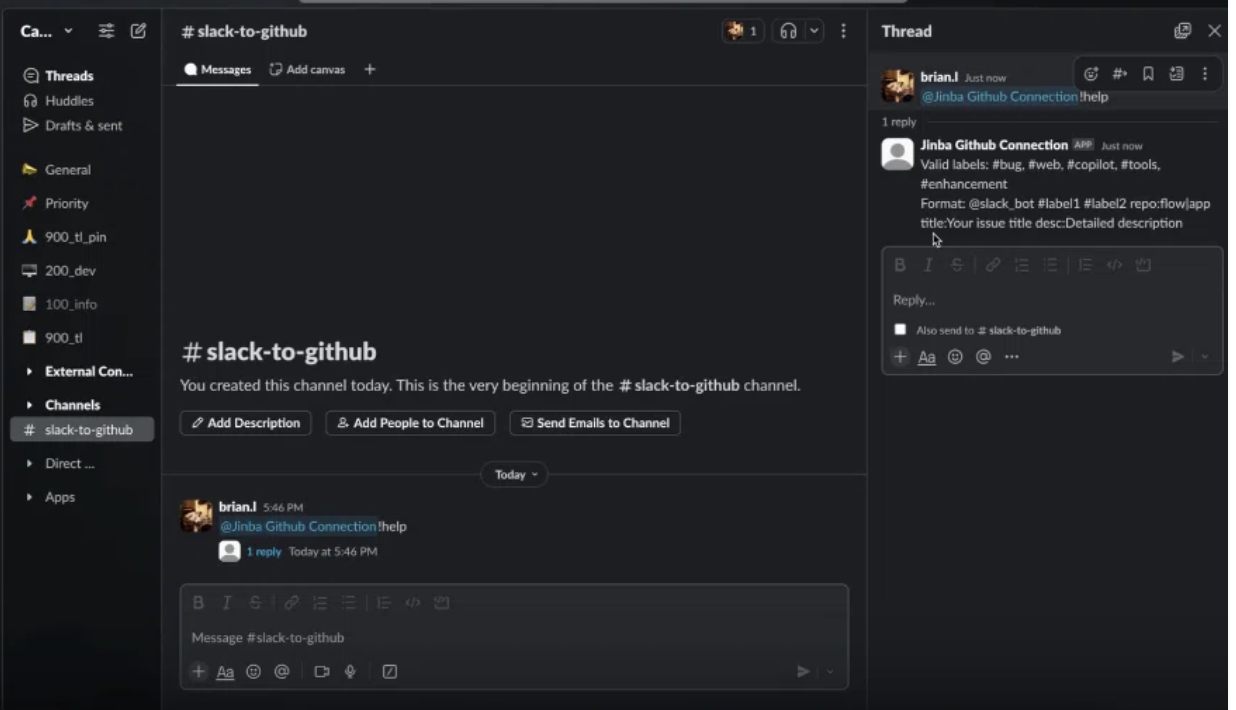
連携が完了後、Slack上でBotにメッセージを送るとスレッドに返答が返ってくる仕組みになっています。
”help”と送るとBotの使い方が返ってきます。
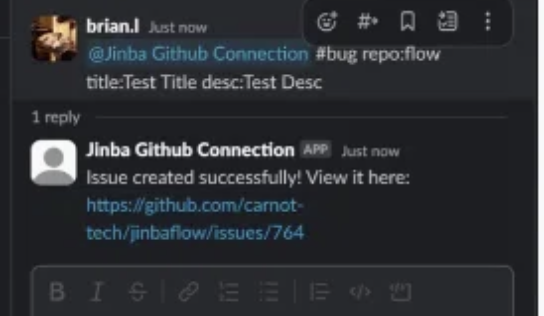
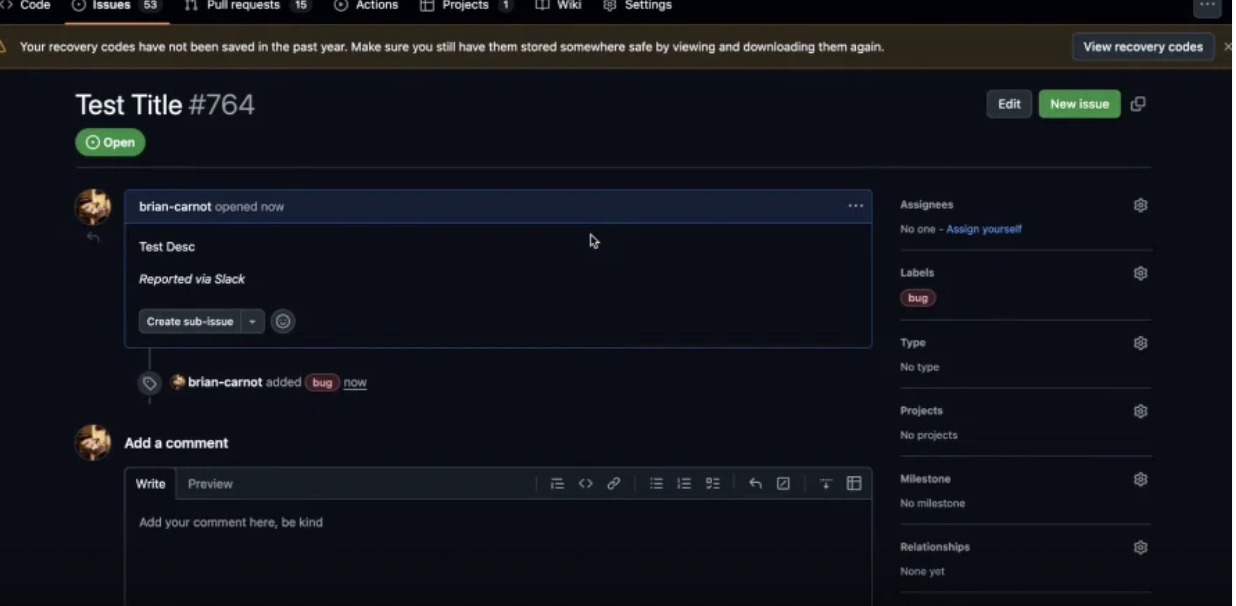
実際にバグの報告を投稿すると、Githubへの投稿が完了したURLがSlackに返ってきます。
URLをクリックしてGithubを確認すると、Slackから投稿した内容が記載されていることが確認できます。
注意点
このワークフローは社内での利用を想定しています。そのため、使用する際は以下のような詳細を調整する必要があります:
- イシューに使用したいタグの設定
- 有効なリポジトリのリスト
- 作成されるイシューのテンプレートを変更したい場合の編集内容 など
動画でも紹介
このタスクの概要動画は公式Xでアップしています。
ぜひ動画でも実際の流れをご確認ください!
jinba.flowはこちらから
この記事で紹介したワークフローは、
jinba.flow
へ登録後すぐに使えます。
ユーザー登録は公式サイトから無料で行っていただけますので、実際に操作を試してみてください!
なお、ワークフローを実行するためには、jinba.flowの登録が必要になります。以前のjinbaflowのアカウント/jinba.appとは別のアカウントが必要となりますので、ご注意ください。
お問い合わせ
ご質問や不明点のほか、「こんなことができたら嬉しい」「こういう機能を作ってほしい」といったご意見・ご要望もぜひお寄せください。
📩 お問い合わせ: contact@carnot.ai