AI Workflows for KYC AML Compliance
Your compliance team is buried. Analysts spend more time chasing missing documents, navigating PDFs, and packaging case files than making decisions. Your rules engine fires thousands of alerts — most of them false positives. And every time a regulation changes, IT needs weeks to update the system.
This is not a problem for people. It is a workflow problem. And it is solvable.
This guide covers the complete automation stack for KYC, AML, and compliance workflows — from initialidentity verification through ongoing monitoring and multi-jurisdictional compliance — with the security and governance architecture that regulated financial institutions require.
Key facts driving urgency:
- Well-designed KYC automation can reduce operational costs by up to 70%
- Leading AML systems achieve 95% detection rates with a 50% reduction in false positives
- Manual compliance processes contribute to a 50% higher rate of compliance violations
- Completing Due Diligence Questionnaires (DDQs) alone can consume days or weeks of analyst time per case
1. Why Compliance Automation Is No Longer Optional
The compliance burden in financial services has never been heavier. Regulatory frameworks are multiplying — the EU's 6th Anti-Money Laundering Directive, the U.S. Corporate Transparency Act, evolving state-level AI governance legislation — and each new requirement adds documentation, controls, and evidence collection to an already stretched function.
The honest reality, as practitioners describe it: "The pain is never the tools. It's always the process and the evidence you actually do the process." Most compliance teams are not struggling because they lack technology — they are struggling because their workflows were never designed to produce the clean, auditable case files that regulators expect.
The right automation does not just move faster. It produces a defensible record of every decision, eliminates the manual bottlenecks that create backlogs, and adapts when regulations change — without requiring a full IT project every time.
2. Understanding KYC, AML, and CIP: Getting the Definitions Right
These three terms are used interchangeably in most conversations — and that imprecision leads to real gaps in compliance program design. Before automating, it is worth being precise.
AML (Anti-Money Laundering)
AML is the broadest framework. It refers to the full set of laws, regulations, and procedures designed to prevent criminals from disguising illegally obtained funds as legitimate income. Everything else sits underneath it.
KYC (Know Your Customer)
KYC is a key component of AML. It is the ongoing process through which financial institutions verify customer identities, understand the nature of their activities, and assess the risk they represent. Critically, KYC is not a one-time gate — it includes three ongoing pillars:
- Customer Identification Program (CIP) — verifying who the customer is at onboarding
- Customer Due Diligence (CDD) — understanding what they do and assessing their risk profile
- Ongoing Monitoring — watching for behavior changes or red flags post-onboarding
CIP (Customer Identification Program)
CIP is the most specific of the three. In the U.S., it is a mandatory regulatory requirement under the USA PATRIOT Act, focused exclusively on verifying a customer's identity at account opening: collecting name, date of birth, address, and identification number; verifying through documentary or non-documentary methods; and screening against government watchlists.
The practical implication: conflating these terms leads to gaps. Under-collecting onboarding is a CIP failure. Failing to reassess risk over time is a KYC failure. Missing the broader suspicious activity picture is an AML failure. Your automation architecture needs to address all three — distinctly.
→ See also: Automating KYC vs AML vs CIP: A Workflow Guide for Account Opening Checks
3. The Real Cost of Manual Compliance Processes
Manual compliance is a liability, not a safeguard. The operational drag is real and measurable:
- Organizations managing compliance manually lose up to 225 hours per year on policy management tasks alone
- 750 hours per year chasing employees for attestations and signoffs
- 2,000 hours per year on employees simply searching for the correct policy
- Organizations with automated compliance see a 50% decrease in compliance violations
But beyond the time cost, there is a deeper problem: evidence of hygiene. As one compliance practitioner put it: "The real bottleneck usually is not verification of accuracy, but evidence of hygiene. When inputs are messy, you still need a clean narrative of what was checked, what was missing, why a decision was made,and under which policy."
Manual processes are structurally incapable of producing that narrative at scale. Analysts work from spreadsheets, emails, and PDFs — none of which generate a step-by-step audit trail that regulators can interrogate. And when regulations change, legacy systems require painstaking re-engineering. "You can change one rule, and everything breaks" is not hypothetical — it is a daily frustration in compliance operations.
4. End-to-End KYC Onboarding Workflow
A well-designed KYC automation workflow handles CIP, KYC, and AML requirements in sequence — not as separate silos, but as a coordinated, event-driven process.
Step 1: Digital Data Collection (CIP Foundation)
The workflow begins with a structured digital intake form collecting the four mandatory CIP data points: name, date of birth, address, and identification number. Structured form fields — not free-text uploads — ensure downstream automation can process data without human interpretation. Missing fields trigger an immediate automated request to the customer, eliminating document-chasing at the source.
Step 2: Automated Document & Identity Verification
Once data is submitted, the workflow triggers parallel verification tracks:
- OCR extraction reads submitted identity documents and cross-references extracted data against form inputs
- Biometric verification confirms the document belongs to the person completing onboarding
- Third-party API calls validate information against credit bureau data, government identity databases, or address registries
Step 3: AML Screening & Risk Scoring
With identity confirmed, the workflow automatically screens the customer against global sanctions and watchlists (OFAC SDN list via FinCEN), Politically Exposed Persons (PEP) lists, and adverse media databases. Simultaneously, a risk score is generated based on geography, industry vertical, anticipatedtransaction volumes, and entity type — in real time, with no analyst involvement for standard cases.
Here is what a complete KYC onboarding workflow looks like when built in Jinba Flow — from initial document validation through watchlist screening, risk tiering, and final compliance sign-off:
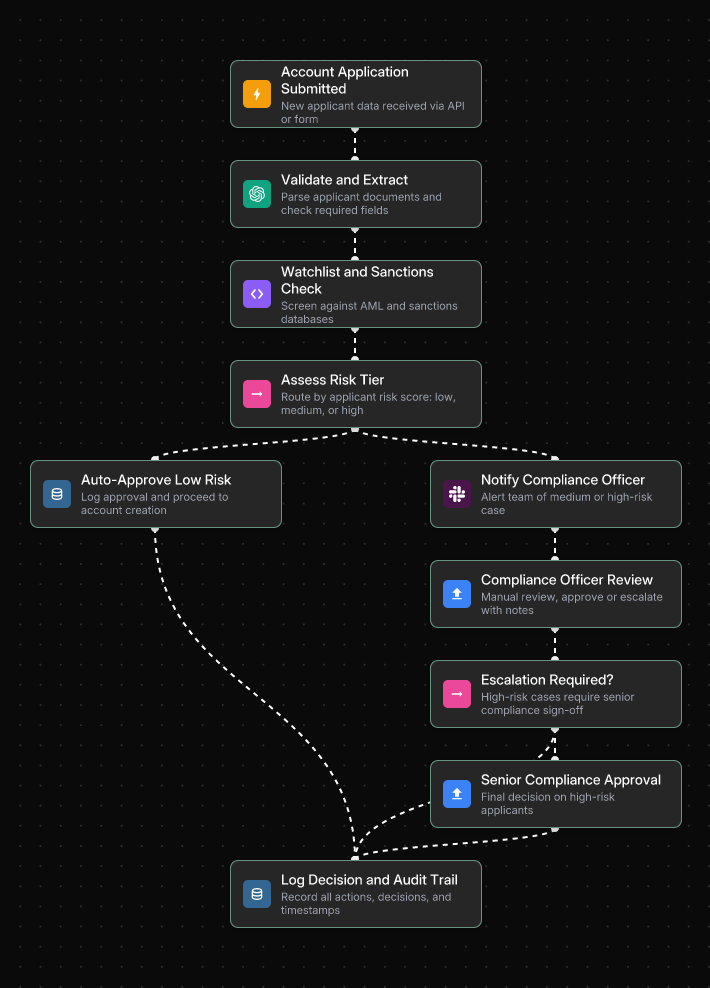
Low-risk applicants are approved and proceed to account creation automatically. Medium and high-risk cases are routed to the compliance officer with full context pre-packaged — no manual evidence gathering required before the decision.
Step 4: Conditional Branching for Due Diligence
This is where a well-built workflow earns its value. Based on the risk score, the workflow branches automatically:
- Low-risk: Straight-through processing. Account approved, records stored, customer notified — often in minutes.
- Medium risk: Additional document requests are automatically triggered. Case flagged for compliance review with a pre-packaged summary.
- High-risk: Enhanced Due Diligence (EDD) triggered — escalated to senior compliance officer, source-of-funds documentation requested, case locked pending human review.
The key principle: automation handles routing and packaging; human expertise is reserved for high-risk judgment calls where it matters.
Step 5: Ongoing Monitoring & Perpetual KYC
Account opening is a moment in time. KYC is an ongoing obligation. Once onboarded, workflows connect to transaction monitoring systems that flag suspicious activity in real time. Leading institutions are moving to Perpetual KYC (pKYC) — continuously re-screening customers against updated watchlists and monitoring material changes in risk profiles, rather than waiting for scheduled annual reviews.
→ See also: How to Build Custom KYC AML Automation Workflows Without Coding
→ See also: How Fortune 500 Banks Streamline Digital Account Opening with AI Workflows
5. AML Screening & False Positive Reduction
Here is an uncomfortable truth: false positives do not come from a lack of AI. They come from overly sensitive rules. Legacy rule-based systems cast too wide on a net, generating enormous alert volumes that compliance teams must manually triage — most of which turn out to be nothing.
AI addresses this at multiple levels:
- Intelligent name matching: Replaces blunt keyword lookups with contextual, probabilistic matching. An AI model understands that "Mohammed Al-Rahman" and "M. Al-Rahman" may or may not be the same person — and scores the match accordingly rather than flagging both as definitive hits.
- Dynamic risk profiling: Analyzes behavioral and transactional data holistically, surfacing non-obvious patterns that static rules miss.
- Generative AI for investigations: Allows compliance analysts to query their data conversationally — "Show me all entities connected to this applicant flagged in the last 90 days with transactions over $10,000" — and receive an immediate, structured answer.
The compounding effect is significant: leading AML models achieve around 95% detection rates with a 50% drop in false positives. Fewer alerts. More accurate escalations. Analysts focused on real risk rather than noise.
The following workflow shows how AML screening operates in Jinba Flow — using AI to validate and enrich each customer profile, assess risk score, and route cases to the appropriate reviewer based on risk tier:
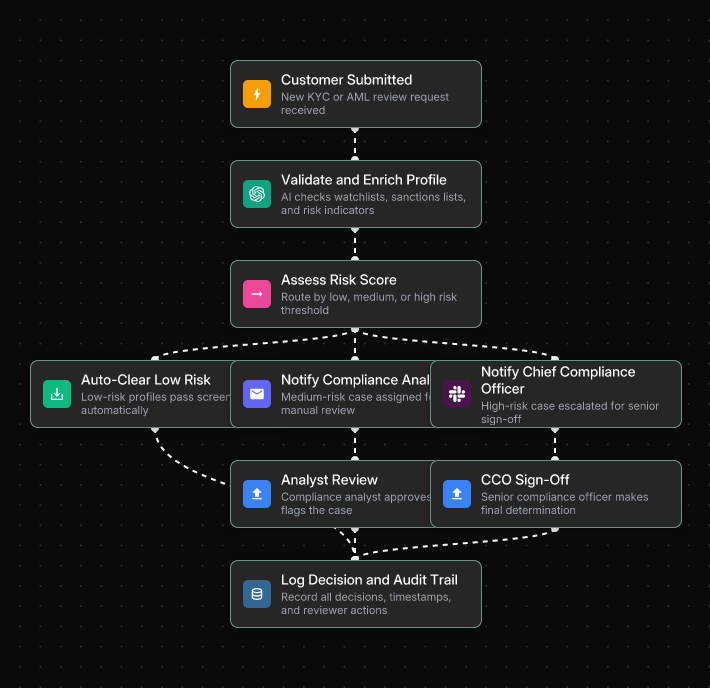
The three-path routing — auto-clear, compliance analyst review, and CCO sign-off — means clean cases never slow down the pipeline, while genuinely high-risk cases receive the senior scrutiny they require.
Critically, designing a good escalation flow is as important as picking the right tool. AI compliance workflows must include clear human-in-the-loop checkpoints for edge cases, sanctions screening, and high-risk decisions. Automation augments judgment — it does not replace it.
→ See also: 7 Steps to Build an Enterprise-Grade Fraud Detection Workflow
→ See also: 7 Bank Account Verification Workflows That Prevent Fraud
6. Multi-Jurisdictional Compliance with Conditional Workflows
If you operate across borders, your compliance burden multiplies fast. Regulations are constantly evolving and often inconsistent across jurisdictions. GDPR violations can reach 4% of global annual turnover. The U.S. Corporate Transparency Act carries its own reporting obligations. The regulatory whiplash is real.
The instinct is to build separate workflows for each jurisdiction — but that is a maintenance nightmare when rules change fast. The smarter approach is a single master workflow with conditional logic that adapts based on the customer's jurisdiction:
- EU customers: GDPR-compliant data consent notices, EU-specific database verification, AMLD6 screening rules
- U.S. customers: SSN collection for CIP compliance, FinCEN and OFAC watchlist screening, Bank Secrecy Act requirements
- Other jurisdictions: Standardized international workflow with compliance officer review for high-risk regions
This architecture keeps compliance logic centralized, auditable, and easy to update. When a regulation changes in one jurisdiction, you update a single conditional branch — not an entirely separate workflow. The "one rule change breaks everything" problem becomes a relic of legacy system design.
→ See also: Automating KYC vs AML vs CIP: A Workflow Guide for Account Opening Checks
7. Audit Trails & Defensible Case Files
Speed without auditability is a compliance of liability. Regulators do not just want accurate decisions — they want documented, auditable, and explainable ones. And when an examiner asks why a customer was approved or flagged, "the system said so" is not an answer.
What a Defensible Case File Looks Like
When a case is flagged for manual review, the workflow should automatically compile:
- All extracted data, API results, OCR outputs, and match scores into a structured case file
- A clear note of what was checked, what was missing, and why the case was escalated
- The specific policy version applied at the time of the decision
- Timestamps for every action taken by both automated systems and human reviewers
Here is what an automated audit trail workflow looks like in practice — triggering evidence collection on a SOC 2 review cycle, routing by control type, and logging every decision to an immutable audit record:
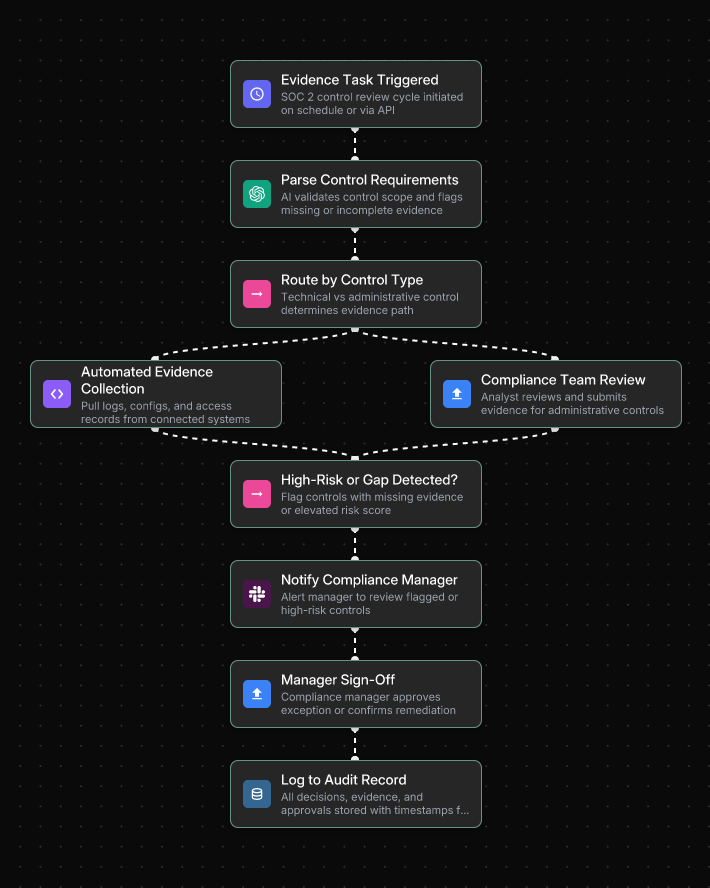
Technical controls are handled through automated evidence collection from connected systems, while administrative controls route to the compliance team for manual submission — both paths converge into the same tamper-proof audit log.
Why Most Tools Fall Short
Most automation tools optimize throughput — not for the "clean narrative of what was checked, what was missing, why a decision was made and under which policy" that regulators expect. Producing audit-ready case files as a byproduct of the workflow itself — not as an afterthought — is what separates genuinely compliant automation from automation that creates a false sense of security.
Immutable Audit Logging
Every workflow execution must be logged automatically: who ran which workflow, what inputs were provided, what outputs were produced, what configuration changes were made. This directly solves the evidence collection burden that audit preparation typically creates. Instead of scrambling to reconstruct activity histories before an audit, logs are continuously generated and ready for review.
→ See also: AI Workflow Automation for Regulated Industries: Compliance Guide
→ See also: Policy Management Automation that Integrates with Your Existing GRC Stack
8. Compliance & Security Architecture
For IT and compliance teams at financial institutions, the security requirements for any automation platform are non-negotiable. Here is the checklist that separates enterprise-ready from demo-ready.
Enterprise Security Requirements
- SOC 2 Type II compliance: Demonstrates controls operating consistently over 6–12 months — the standard enterprise partners and regulators require. Not Type I.
- On-premises and private cloud hosting: Sensitive customer data — PII, transaction history, compliance case files — cannot be routed through shared public infrastructure.
- SSO + RBAC: Single Sign-On with your existing identity provider (Okta, Azure AD). Role-Based Access Control ensures compliance analysts execute workflows without modifying them; architects design without executing.
- Immutable audit logging: Every action, input, and output logged with full traceability — non-negotiable for HIPAA, SOX, and FedRAMP environment.
- Private AI model hosting: Via AWS Bedrock, Azure AI, or self-hosted models. Sensitive compliance data never passes through a public AI API.
Governance Architecture: Build vs. Run Separation
The governance challenge in compliance automation is not the platform — it is about who can build and who can run. When workflow designers and workflow executors are the same people, you lose auditability and introduce error risk.
The architecture that works for technical teams and compliance architects design workflows in a builder interface with full visibility into decision logic. Business users — analysts, relationship managers, ops staff — execute approved workflows through a controlled interface that does not expose the underlying logic. Every execution is logged. No accidental modifications. No governance gaps.
Below is an example of how a workflow deployment request is handled in Jinba Flow — routing based on data sensitivity, enforcing security review for high-sensitivity requests, and deploying only to approved private environments:
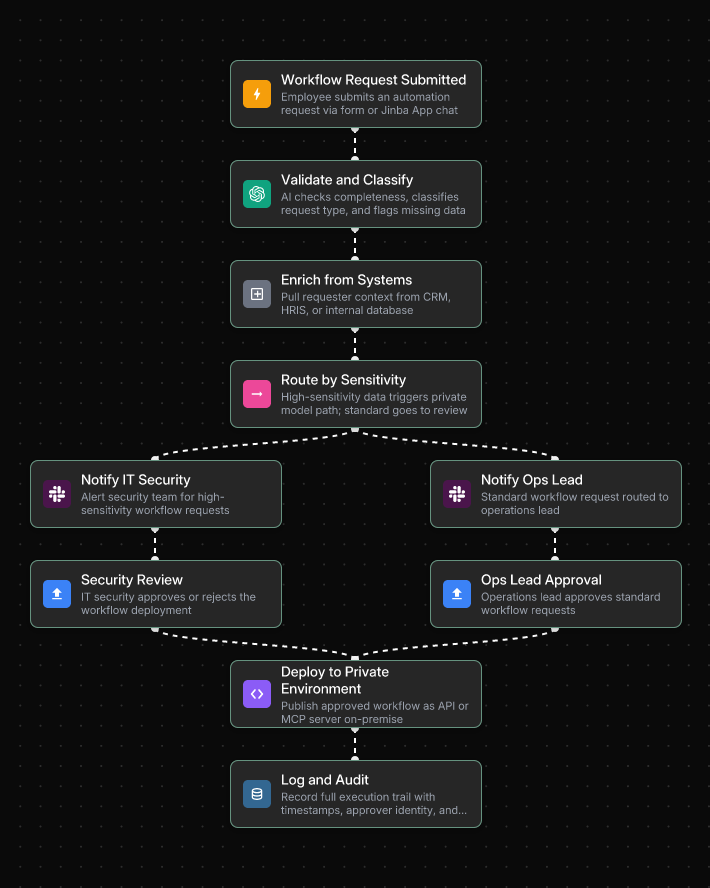
Every deployment follows the same governed path — approved by either IT Security or the Ops Lead depending on sensitivity level — and every action is logged automatically for the audit record.
→ See also: Top 5 SOC 2 Workflow Automation Tools for Enterprise
→ See also: Implementing Automated Investment Analysis in SOC II Compliant Environments
9. Implementation Roadmap
The compliance teams that succeed with automation share one characteristic: they start narrow, prove value, and expand systematically. Big-bang compliance automation projects consistently underdeliver.
- Week 1: Audit your current workflows. Document every step of your most common compliance processes — who does what, when, and in what system. Identify where things get stuck waiting for human response. Prioritize volume and pain.
- Week 2: Choose your platform and build your first workflow. Select a platform with enterprise-grade controls (SOC 2, SSO, RBAC, audit logging). Use Chat-to-Flow generation to describe your process in plain language and generate a workflow draft automatically. First target: policy approval routing or KYC document collection — both are high-frequency with measurable ROI.
- Week 3: Test, refine, and pilot. Run the workflow against your messiest 10% of cases — inconsistent names, partial docs, edge-case entity structures. Iterate until every path produces a defensible output. Pilot with a small group before full rollout.
- Week 4: Deploy, go live, and measure. Publish the workflow as a production-ready API or batch process. Track time saved per case, error rate improvement, and audit readiness. Use early results to build the business case for expansion.
After the initial deployment, the scaling path follows a clear sequence: KYC document collection → AML screening automation → multi-jurisdictional conditional logic → perpetual KYC monitoring. Each stage builds on the previous one and compounds the efficiency gains.
→ See also: How to Automate Policy Management Workflows in 4 Weeks
10. Getting Started with Jinba Flow
Jinba Flow is a YC-backed, SOC II compliant AI workflow builder purpose-built for Fortune 500 enterprises. With over 40,000 enterprise users running automated workflows daily, it directly addresses the core pain points that compliance teams experience every day.
Why Jinba for KYC/AML Compliance
- Chat-to-Flow Generation: Describe a compliance workflow in plain language — "Create a CIP workflow for US customers that collects name, DOB, address, and SSN, verifies the address with a third-party API, and screens against the OFAC watchlist" — and Jinba generates a deployable workflow draft instantly. No engineering ticket. No waiting.
- Visual Workflow Editor: Every decision branch, every conditional rule, every escalation path is visible as a flowchart. Compliance teams can audit logic. Auditors can understand the process. No black boxes.
- Deploy as API or MCP Server: Publish compliance workflows as reusable endpoints that integrate with your existing CRM, case management system, or core banking platform — without rebuilding infrastructure from scratch.
- Evidence of hygiene by design: Every workflow execution is logged in full — step-by-step — providing an auditable record of exactly what happened, when, and under which logic. This is what the compliance community means by tools that "show their homework."
- Jinba App for non-technical execution: Compliance analysts, relationship managers, and ops staff execute approved workflows through a simple chat interface or auto-generated input forms. No custom UI. No risk of accidentally modifying workflow logic.
- SOC 2 + private hosting: On-prem and private cloud deployment options. Private model hosting via AWS Bedrock, Azure AI, or self-hosted. Sensitive compliance data never touches a public API.
Your First Workflow to Build
Start with KYC document collection or policy approval routing — high frequency, measurable ROI, and low compliance risk for a first deployment. From there: AML screening integration, multi-jurisdictional conditional logic, and perpetual KYC monitoring.
The compliance teams winning today are not the ones who automated everything at once. They are the ones who built one well-governed workflow, proved the value, and expanded from there.
Frequently Asked Questions
What is the difference between KYC, AML, and CIP?
AML (Anti-Money Laundering) is the broadest framework — the full set of laws and procedures to combat financial crime. KYC (Know Your Customer) is a key component of AML: the ongoing process of identifying, verifying, and monitoring customers to assess their risk. CIP (Customer Identification Program) is the most specific — a mandatory regulatory requirement focused exclusively on verifying a customer's identity at account opening.
Why are manual KYC/AML processes liability?
Manual processes are structurally incapable of producing the clean, step-by-step audit trail that regulators require. They rely on spreadsheets, emails, and PDFs — none of which generate a defensible case file at scale. They also create inconsistency: two analysts reviewing the same case may apply different standards. And they are brittle: one rule of change can break the entire process.
How does AI reduce false positives in AML screening?
AI replaces blunt keyword-based rules with contextual, probabilistic matching. Instead of flagging every name variation as a definitive hit, AI models score the likelihood of a match based on context — dramatically reducing the alert volume that compliance teams must manually triage. Leading systems achieve a 50% reduction in false positives while maintaining 95% detection rates.
How do I handle compliance across multiple jurisdictions?
The most effective approach is a single master workflow with conditional logic that adapts based on the customer's jurisdiction — applying GDPR rules for EU customers, Bank Secrecy Act requirements for U.S. customers, and a standard international workflow for others. When a regulation changes in one jurisdiction, you update a single conditional branch rather than rebuilding a separate workflow.
What security features are non-negotiable for a compliance automation platform?
SOC 2 Type II compliance, on-premises or private cloud hosting, SSO and RBAC, immutable audit logging, and private AI model hosting. These are not optional extras — they are the baseline requirements for any platform handling sensitive financial compliance data in a regulated environment.
Can non-technical compliance staff use automated workflows?
Yes — and this is a critical design requirement. The most effective compliance automation platforms separate the build environment (where technical teams design workflows) from the execution environment (where analysts and ops staff run them). Non-technical users should be able to execute complex, pre-approved workflows through a simple chat interface or auto-generated form, without any risk of accidentally modifying the underlying logic.
The Bottom Line
Compliance automation is not about moving faster. It is about producing better evidence, reducing the manual work that creates backlogs and errors, and building workflows that can adapt when regulations change — without a full IT project every time.
The gap between what regulators expect and what manual processes can deliver is widening. The organizations closing that gap are not doing it by hiring more analysts. They are doing it by building governed, auditable workflows that produce defensible case files as a byproduct of every decision — automatically, consistently, and at scale.
Start with one workflow. Build the audit trail in from day one. Scale from there.