AI Workflows for Contract Management and Review
Three vendor contracts auto renewed without anyone's knowledge. Two others expired unnoticed, leaving your organization in a gray-area limbo. Legal is still chasing approvals over email. And nobody can find the latest version of that renewal agreement.
Sound familiar? For enterprise legal and procurement teams, this isn't an edge case — it's Tuesday. The real pain isn't a lack of tools. It's that most contract management tools exist in isolation, disconnected from the broader systems that power the rest of the business. You end up with another silo — not a solution.
This guide covers the complete AI automation stack for contract lifecycle management: from initial drafting and AI-powered review through approval routing, obligation tracking, renewal management, and compliance — with the security architecture that enterprise legal and IT teams require.
Key facts driving urgency:
- Legal and operations teams waste 15+ hours a week on manual contract tasks because most AI analysis tools are disconnected from other business systems
- AI can spot risky clauses with an average accuracy rate of 94%, while human reviewers average 85%
- AI can reduce contract review time by up to 50% by handling the initial pass and routing automatically
- The global CLM automation market was valued at $48.7 billion in 2023 and is projected to hit $179.5 billion by 2032
- Missing a renewal window or unfulfilled obligation can result in automatic rollovers, penalties, or unwanted vendor relationships continuing for another year
1. Why Contract Management Automation Is No Longer Optional
Enterprise contract management has a data problem. Critical information is scattered across SharePoint folders, local drives, email inboxes, and paper binders — with no consistent structure and no reliable way to know which version is current. When an auditor asks for evidence of contract acknowledgment, someone spends a week piecing together confirmation emails and spreadsheet logs.
The problem isn't a lack of effort. It's a lack of workflow. As one procurement professional put it bluntly: "Using outdated technology is just an unnecessary drain on your time and resources due to the manual processes that could otherwise be automated." And the follow-on observation is just as telling: "Most people persist with the big-brand legacy tools simply because they don't know how advanced the latest offerings are."
The real cost of this inertia is measurable. Three auto-renewed contracts. Two expired agreements creating legal gray areas. An approval that sat in someone's inbox for three weeks because no one knew whose turn it was to act. These aren't hypothetical risks — they're the daily operational reality of manual contract management at scale.
Modern AI contract management doesn't just store contracts — it understands them, routes them, tracks them, and surfaces risks before they become problems. No-code workflow platforms have moved that capability directly into the hands of legal and operational professionals who understand these processes best.
2. The Core Challenges in Enterprise Contract Management
Data Fragmentation and the Single Source of Truth Problem
Critical knowledge spread across disparate systems — PLM, ERP, shared drives, and email — causes errors when teams can't find what they need or work from outdated information. For new hires, struggling to find and interpret contracts is a daily frustration that slows ramp-up time and increases the probability of mistakes.
The fix is a centralized, executable contract repository — not just a folder, but a system where every contract is versioned, tagged with key metadata, and accessible to the right stakeholders through a single interface. When everyone works from the same playbook, errors caused by outdated specs or misinterpreted terms drop significantly.
Disconnected Tools Creating New Silos
Most enterprise contract analysis tools solve the analysis step — and then stop. Extracting a renewal date is useful. But automatically updating your CRM, creating a calendar event for the account owner, triggering an invoice in your finance system, and alerting the responsible team? That requires a workflow layer that connects contract intelligence to the rest of your business.
When the AI tool job ends, manual work begins. Someone copies the data, someone sends the email, someone updates the spreadsheet. This is the gap that a dedicated workflow automation layer fills — treating contract AI as a trigger rather than an endpoint.
Approval Chains That Live in Email
Inconsistent approval chains create bottlenecks and risk having contracts executed without proper authority. Manual tracking is unreliable and creates gaps that can undermine your legal position. A contract that requires sign-off from Legal, Finance, and the business owner — with no system enforcing the sequence — will inevitably produce the wrong outcome: a skipped approver, an expired deadline, or a contract executed before all conditions are met.
3. AI Contract Analysis & Review
The real value of AI contract analysis isn't replacing legal expertise. It's eliminating the operational overhead — the repetitive, high-volume, low-judgment work that consumes hours and introduces risk through sheer human fatigue.
What AI Reviews — And How
Modern AI contract analysis uses Natural Language Processing (NLP) to structure contract data, Machine Learning to identify patterns and risks, and OCR to digitize scanned documents. The core functions are well-established:
- Deviation detection: AI trained on your legal playbook instantly spots language that doesn't conform — uncapped indemnity, one-sided termination rights, non-standard limitation of liability clauses. Human reviewers miss these under volume. AI catches them consistently.
- Compliance verification: AI cross-references contract terms against GDPR, CCPA, or internal data policies in real time, flagging compliance gaps before a contract ever reaches a signature page.
- Dynamic risk scoring: Contracts assigned a quantitative risk score (1–100) based on high-risk clause presence, non-standard terms, and contract value — enabling legal teams to triage effectively rather than reviewing everything manually.
- Obligation and deadline extraction: AI automatically identifies effective dates, contract terms, and renewal notification periods — populating a centralized tracker, so nothing slips through the cracks.
The Accuracy Gap
AI contract review accuracy averages 94% for risky clause identification, compared to 85% for human reviewers. Across hundreds of contracts annually, that gap translates directly into financial and legal exposure. The right model for enterprise legal teams: AI handles the first-pass issues list; human reviewers apply judgment to the flagged items. Speed and accuracy, without sacrificing oversight.
Here is what an AI-powered contract review workflow looks like in Jinba Flow — automatically extracting key clauses, validating against standard terms, assessing risk, and routing based on risk score:
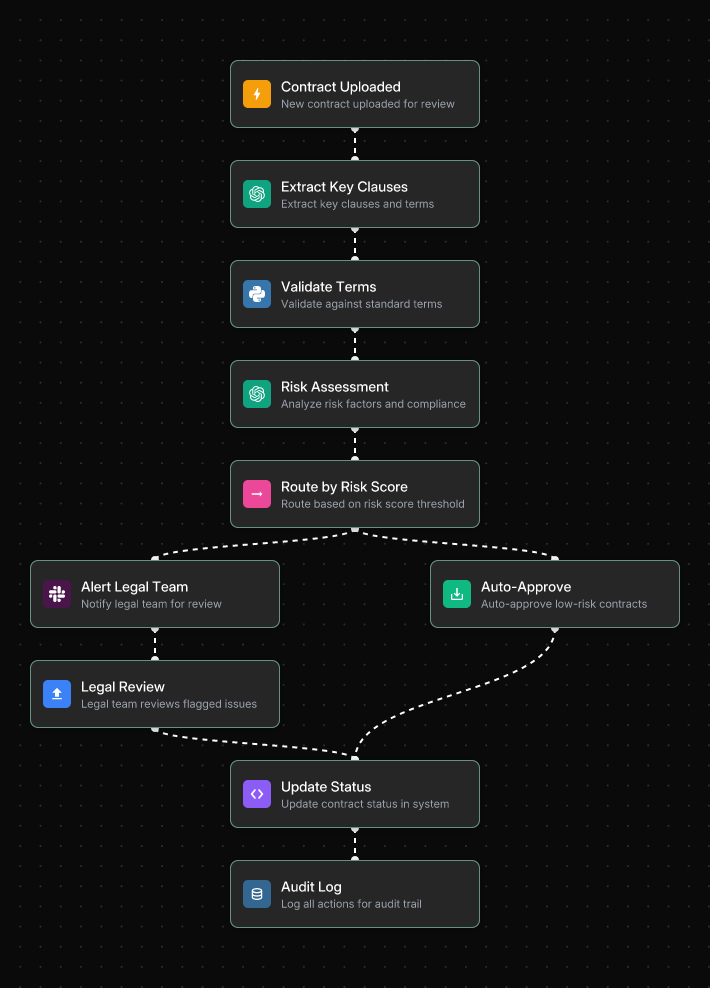
Low-risk contracts are auto-approved and their status updated in the system instantly. High-risk contracts are flagged to the legal team with a pre-packaged summary of identified issues — so reviewers open a file ready to decide, not ready to read from scratch.
Building a Searchable Contract Repository
Contracts stored as flat PDFs are a black box. Using a workflow platform, you can chain together OCR and NLP to transform an entire contract portfolio into a fully queryable knowledge base. Legal teams can ask "Show me all contracts with a limitation of liability clause under $1M" — and get instant, accurate results across thousands of documents. Self-service contract intelligence: sales, procurement, and finance get answers without involving legal at all.
→ See also: 10 Ways AI Contract Analysis Reduces Legal Risk (With Automation Examples)
→ See also: 7 AI Contract Analysis Use Cases You Can Automate Without Coding
4. Contract Approval Workflow Automation
Even the best-reviewed contract stalls if approval routing is broken. Manual approval chains — managed over email, tracked in spreadsheets — introduce delay, skip approvers, and create compliance gaps. Automated approval workflows enforce business rules, route contracts to the right stakeholders automatically, and log every action with a timestamp.
Conditional Approval Logic
A well-designed approval workflow applies predefined rules to every contract submission:
- Contract value under $10K: Department head only
- Contract value $10K–$50K: Department head → Finance
- Contract value over $50K: Department head → Finance → Legal
- Data processing agreements: Security team added to the routing sequence
- International contracts: Regional legal counsel looped in automatically
The following workflow shows how a contract approval process operates in Jinba Flow — routing by contract type, enforcing the appropriate review path, and requiring General Counsel sign-off for high-value or high-risk contracts:
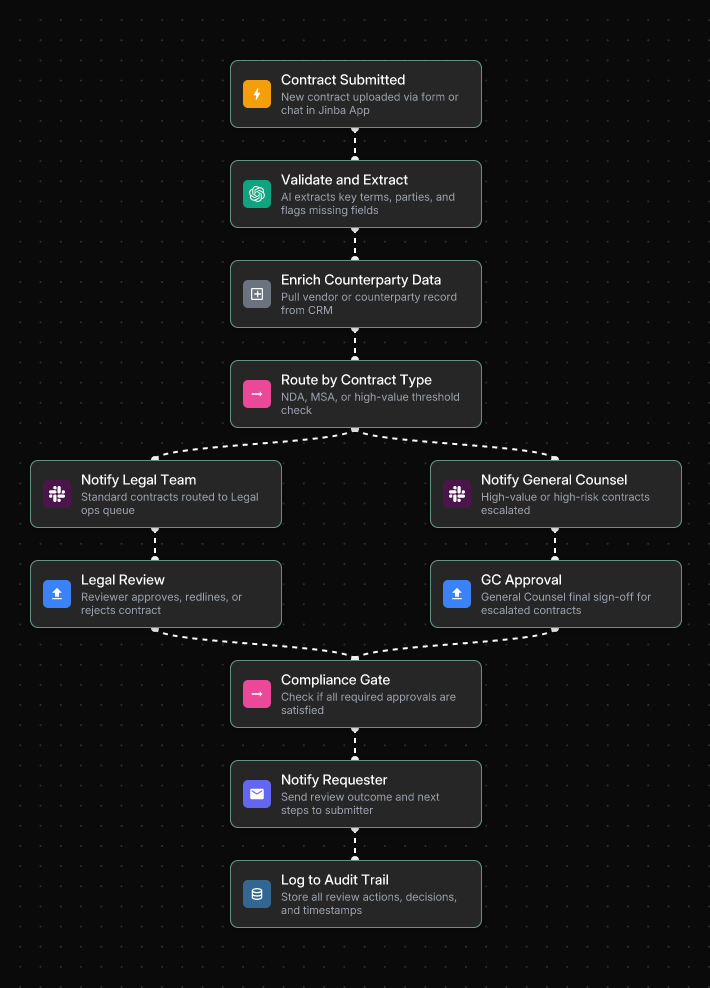
Standard contracts route to the Legal ops queue for review. High-value or high-risk contracts are immediately escalated to General Counsel. Both paths converge at the Compliance Gate — ensuring all required approvals are confirmed before the requester is notified.
Below is a second example showing how contract value thresholds drive approval routing — with contracts above $250k automatically triggering both Legal and Finance review, and General Counsel sign-off required above $250k:
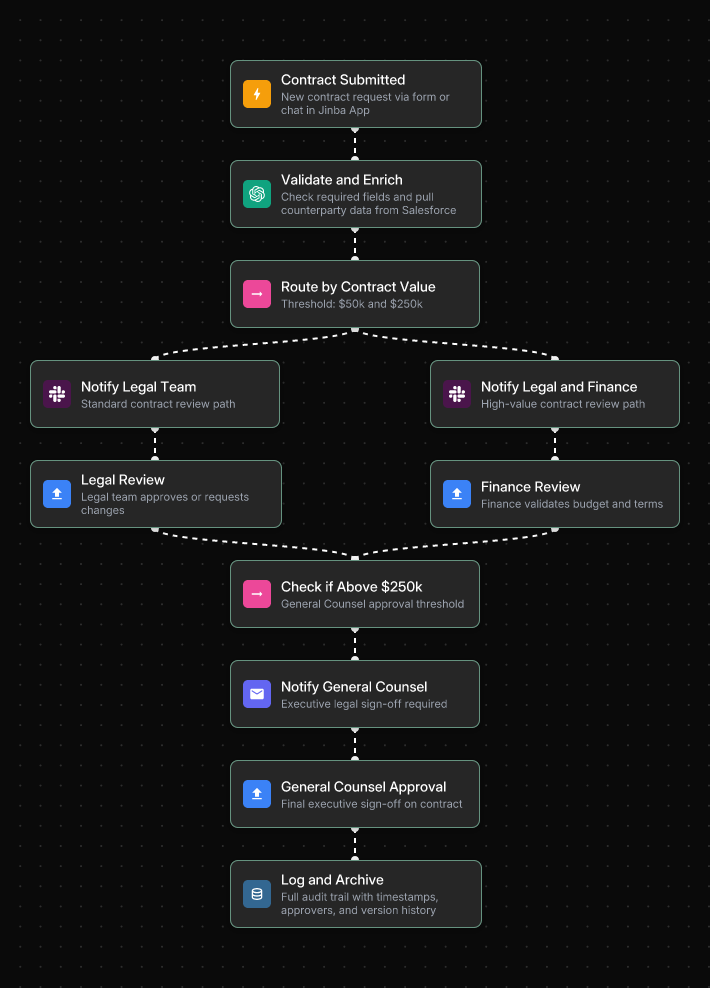
Every approval decision — including the approver identity, timestamp, and version of the contract reviewed — is logged automatically to a full audit trail with timestamps and version history.
Every approver receives all relevant context — contract summary, risk score, flagged clauses — rather than a raw document. Smart notifications via Slack or email keep approvers on track without manual follow-up. Every approval is timestamped and logged, creating a complete audit trail for compliance.
Intake and Generation
The approval workflow starts at intake. Rather than a legal team manually selecting templates and filling in details, an automated intake workflow starts with a structured form or chat interaction. The user inputs key parameters — contract type, counterparty, jurisdiction, value threshold — and the workflow dynamically selects the appropriate template, populates it with the provided data, and generates a ready-to-review draft. What previously took days takes minutes.
E-Signature Integration
With approvals secured, the workflow automatically generates the final document and sends it for electronic signature — no manual PDF downloading, no email attachments, no version confusion. Direct integrations with DocuSign, Adobe Acrobat Sign, or Dropbox Sign provide a legally binding audit trail that captures exactly when the document was opened, viewed, and signed.
→ See also: End-to-End Automated Contract Workflows with AI
→ See also: AI for Contract Management: Building Enterprise-Grade Workflows Without Code
5. Obligation Tracking & Renewal Management
Signing the contract is not the end of the process. It's the beginning of an ongoing obligation management function that most organizations handle calendar reminders — which get ignored — and spreadsheets — which don't update themselves.
Automated Obligation Extraction
Post-execution, an AI-powered workflow runs a data extraction step that pulls key dates, obligations, payment terms, and renewal windows from the signed document and writes them into a centralized database, CRM, or reporting dashboard. This solves the "getting all of that data in one place" problem. Compliance obligations surface automatically. Nothing is buried in a PDF.
Renewal Tracking That Actually Works
A renewal tracking workflow triggers notifications based on contract end dates pulled during data extraction:
- 90 days before expiry: Task created for the contract owner, Slack notification sent to the legal team
- 60 days before expiry: Escalation if no action has been taken
- 30 days before expiry: Final reminder with specific next steps — renew, renegotiate, or issue non-renewal notice
Here is an example of how contract obligation tracking and executive approval routing works in Jinba Flow — parsing clauses, routing by risk level, and triggering executive sign-off for contracts above the value threshold:
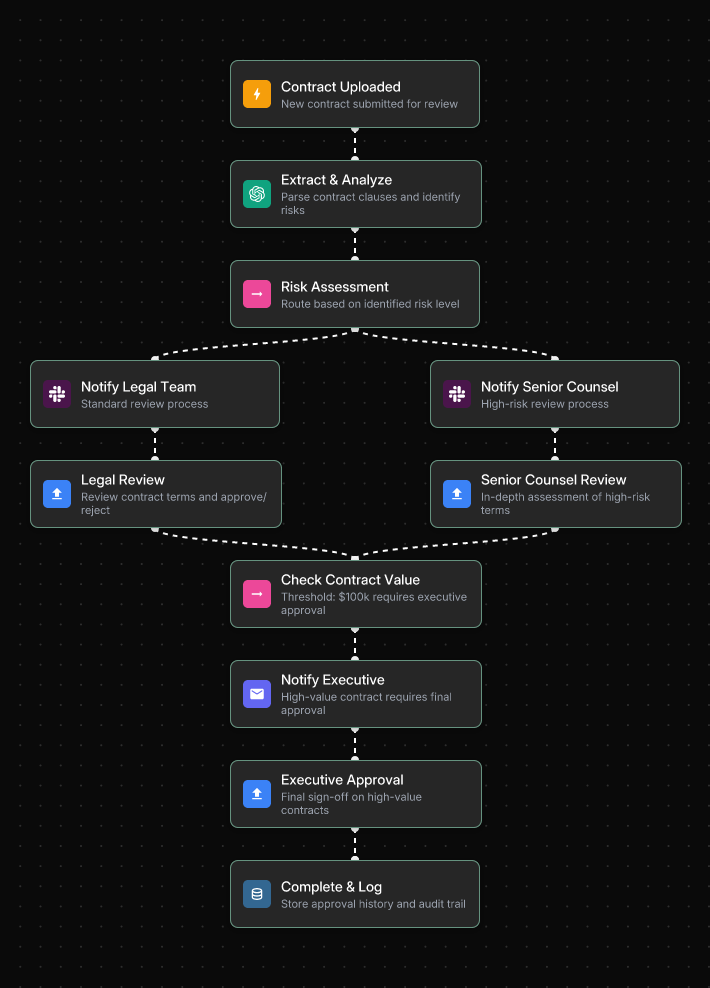
Once executed, the workflow stores the complete approval history and audit trail automatically — so when renewal time comes, the contract owner has full context on what was agreed, who approved it, and when.
Renewals become intentional decisions, not accidents. This is one of the highest-ROI automations a legal or operations team can deploy — preventing costly oversights while ensuring time for renegotiation.
Perpetual Contract Monitoring
Beyond renewal tracking, contracts require ongoing compliance monitoring. When a vendor's risk profile changes, when a key obligation deadline approaches, when a data processing term becomes non-compliant with an updated regulation — automated monitoring surfaces these issues in real time rather than during a periodic manual audit.
→ See also: 7 AI Contract Analysis Use Cases You Can Automate Without Coding
→ See also: 5 Enterprise AI Contract Management Solutions Compared (2026 Guide)
6. CLM Tool Comparison: Point Solutions vs. Workflow Platforms
The CLM market is crowded, and not all tools are built for the same problem. The key distinction is between dedicated CLM point solutions and flexible workflow automation platforms.
Dedicated CLM Point Solutions
Platforms like Ironclad, Icertis, and Sirion are purpose-built for the contract lifecycle — drafting, negotiation, execution, storage, and renewal — within a single system. They work well when your needs fit their model. Ironclad is strong on ease of use and quick implementation. Icertis excels in Microsoft-ecosystem enterprises with complex global operations. Sirion delivers deep compliance tracking for highly regulated industries.
The limitation: most point solutions solve the analysis step and stop there. They don't automatically push extracted contract intelligence into your CRM, ERP, or finance systems. The manual "last mile" remains — someone still copies the data, sends the email, updates the spreadsheet.
Workflow Automation Platforms
A workflow automation platform like Jinba Flow approaches the problem differently. Rather than a pre-built contract tool, it's a platform for building the exact contract automation your enterprise needs — connecting contract AI to the rest of your business stack.
The practical difference: when an MSA is executed in Ironclad, a Jinba Flow workflow can simultaneously update the Salesforce account record, create a finance task in Asana, and post a summary to the legal team's Slack channel. Contract intelligence becomes a trigger for coordinated action across every system that needs to be known.
How to Choose
- If your contract needs are conventional and well-defined: A point solution like Ironclad gets you there in weeks
- If you're an Azure-first enterprise with complex global CLM: Icertis deserves serious evaluation
- If your workflows are cross-functional and need to connect contract data to CRM, ERP, and finance: A workflow platform like Jinba Flow delivers the integration depth that point solutions can't
→ See also: 5 AI Contract Analysis Tools That Integrate with Enterprise Workflows
→ See also: 5 Enterprise AI Contract Management Solutions Compared (2026 Guide)
7. Compliance & Audit Trails
In disputes or regulatory audits, a clear chain of custody for a contract is non-negotiable. Manual tracking is unreliable and creates gaps that can undermine your legal position. Automation platforms solve this structurally — every step in the contract workflow is logged automatically.
What a Complete Audit Trail Captures
- Who initiated the workflow and when
- What the AI risk score was and which clauses were flagged
- Who approved, at what stage, and the exact timestamp
- What version of the contract was in effect at each decision point
- Every data access, configuration change, and system integration call
The following workflow demonstrates how a compliance-ready contract review process operates in Jinba Flow — routing by risk level, compiling feedback from all reviewers, and archiving a complete audit trail with every decision logged:
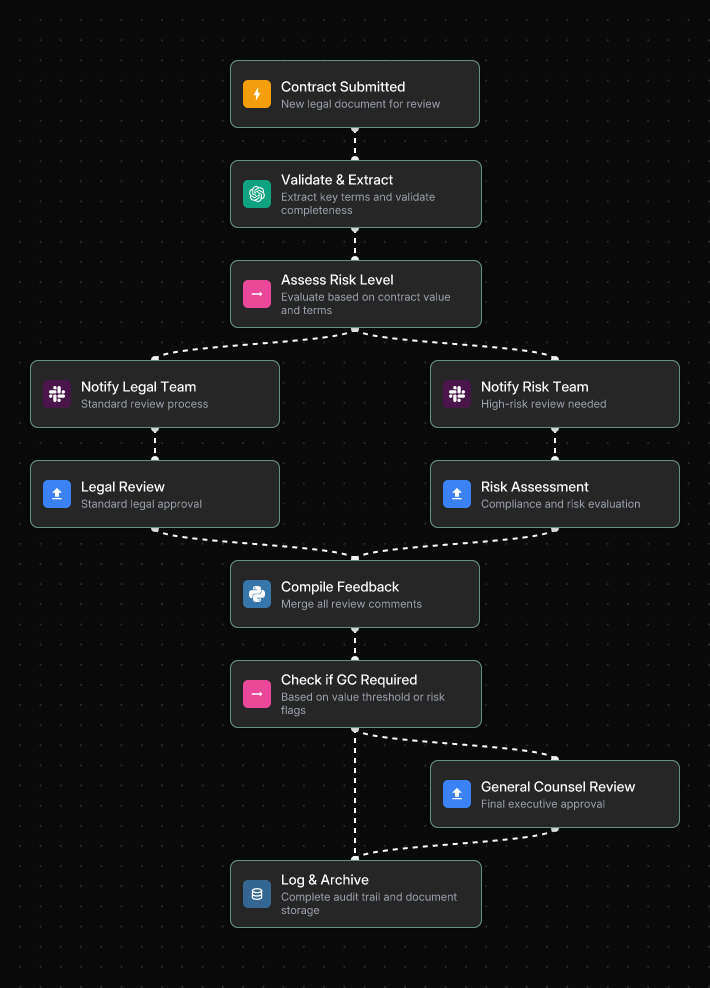
Every review action — Legal approval, Risk Assessment, General Counsel sign-off — is compiled into a single audit record stored automatically. When regulators ask for documentation, the evidence is already there.
This log can be exported or pushed to a centralized compliance system on demand. The shift from manual tracking to automated audit logging is what transforms audit preparation from a weeks-long scramble into a near-real-time process.
Regulatory Compliance Requirements
Contract management workflows must be designed with specific regulatory requirements in mind:
- GDPR and CCPA: Data processing agreements must be verified, tracked, and retrievable. Automated compliance verification catches gaps before they become regulatory exposure.
- SOX: Financial contract terms must be accurately recorded and auditable. Automated extraction and CRM/ERP integration eliminate manual re-entry errors that create SOX risk.
- Industry-specific requirements: Healthcare (HIPAA Business Associate Agreements), government contracting (FAR clauses), and financial services (regulatory disclosures) each have specific documentation requirements that automated workflows can enforce consistently.
→ See also: AI Workflow Automation for Regulated Industries: Compliance Guide
8. Security & Governance Architecture
Contracts contain some of your organization's most sensitive information: pricing strategies, proprietary terms, M&A intentions, and personal data. The security requirements for any contract automation platform must reflect that sensitivity.
Enterprise Security Requirements
- SOC 2 Type II compliance: Demonstrates security controls operating consistently over time — the standard enterprise legal and IT teams require before approving any new platform.
- On-premises and private cloud hosting: Contract data — especially M&A due diligence files, executive compensation agreements, and IP licensing terms — cannot be routed through shared public infrastructure.
- SSO + RBAC: Legal architects design and govern workflows. Sales, procurement, and finance execute approved workflows without being able to modify the underlying logic. Every role has exactly the access it needs.
- Immutable audit logging: Every contract action — view, edit, approve, execute — logged automatically and tamper-proof.
- Private AI model hosting: Via AWS Bedrock, Azure AI, or self-hosted models. Sensitive contract data and proprietary term analysis never pass through a public AI API.
Build vs. Run Separation in Contract Workflows
The governance principle that matters most is separating who designs contract workflows from who executes them. Legal and operations architects define the approval of logic, compliance checks, and integration points in a builder interface. Sales reps, procurement managers, and finance staff trigger and execute approved workflows through a controlled chat interface or auto-generated form — without any risk of accidentally modifying approval routing or compliance rules.
This separation is what makes enterprise-grade contract automation genuinely safe to deploy across a distributed, multi-department organization.
Below is an example of how sensitive data access is governed within a contract workflow — classifying by sensitivity level, applying the appropriate approval path, and generating a comprehensive audit log for every access event:
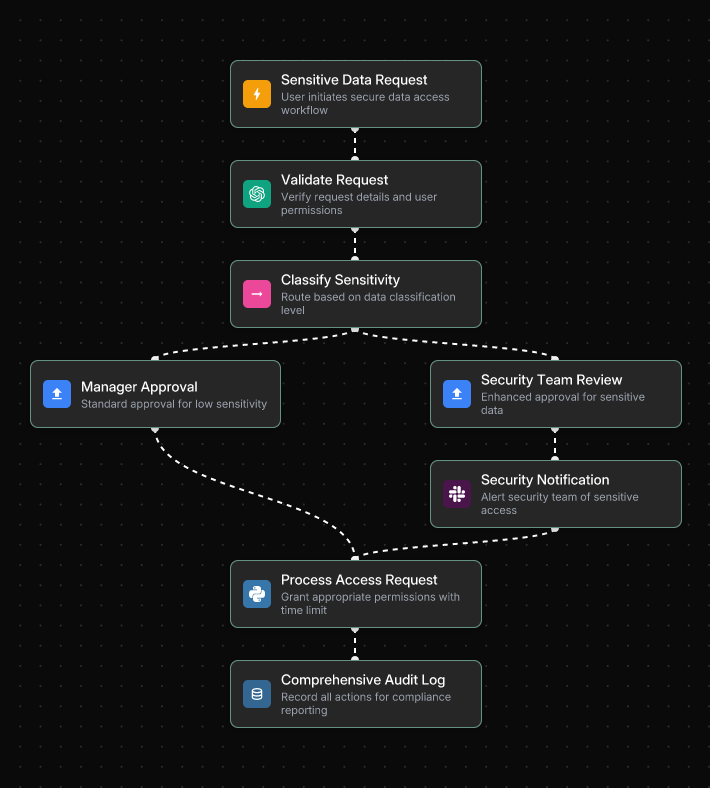
Standard requests receive manager approval and proceed automatically. Sensitive contract data — M&A terms, executive compensation, IP agreements — triggers an additional security team review before access is granted, ensuring every access is documented and approved.
→ See also: Top 5 SOC 2 Workflow Automation Tools for Enterprise
9. Implementation Roadmap
The legal and operations teams succeeding with contract automation share one characteristic: they start with a single, high-pain process, prove the value, and expand systematically. Trying to automate the entire contract lifecycle at once consistently leads to failure.
- Phase 1 — Pilot (Months 1–3): Start with a single high-volume, low-risk contract type. NDAs are the most common first choice — high frequency, standardized structure, clear ROI, low compliance risk. Validate the workflow, gather feedback from legal users, and measure time savings. Prove the value before expanding.
- Phase 2 — Department rollout (Months 3–7): Expand additional contract types within the legal or procurement function — vendor agreements, MSAs, service contracts. Integrate the workflow with your existing CRM or ERP via API. Legal teams stop being the bottleneck for routine contract questions.
- Phase 3 — Cross-functional deployment (Months 7–12): Integrate workflow APIs with Sales (Salesforce), Finance (ERP), and HR systems. Standardize contract intake across business units. Non-legal teams — sales reps, procurement managers, finance staff — execute contract workflows through a simple chat interface without involving legal routine requests.
The technology to execute this phased approach exists today. The constraint is never the platform — it's the discipline to start narrowing and expanding systematically.
→ See also: End-to-End Automated Contract Workflows with AI
10. Getting Started with Jinba Flow
Jinba Flow is a YC-backed, SOC II compliant AI workflow builder purpose-built for Fortune 500 enterprises. With over 40,000 enterprise users running automated workflows daily, it's designed to solve the core problem that most contract management tools leave open: connecting contract intelligence to the rest of your business.
Why Jinba for Contract Management
- Chat-to-Flow Generation: Describe your contract review or approval workflow in plain language — "When an MSA is uploaded, extract payment terms and governing law clauses, flag deviations from standard terms, and route to Legal if the risk score exceeds 70" — and Jinba generates a deployable workflow draft automatically.
- Visual Workflow Editor: Every approval branch, every conditional rule, every integration points visible as a flowchart. Legal teams can audit the logic. IT can validate integration points. No black boxes.
- Deploy as API or MCP Server: Publish contract workflows as reusable endpoints that integrate with Salesforce, SAP, NetSuite, or any internal system — without custom engineering work.
- Evidence by design: Every contract action is logged automatically. Audit-ready case files as a byproduct of the workflow, not an afterthought.
- Jinba App for non-technical execution: Sales reps, procurement managers, and finance staff execute approved contract workflows through a simple chat interface or auto-generated form. No legal involvement is required for routine requests.
- SOC 2 + private hosting: On-prem and private cloud deployment. Private model hosting via AWS Bedrock, Azure AI, or self-hosted. Sensitive contract data never touches a public API.
Your First Workflow to Build
Start with NDA processing or contract renewal tracking — high volume, immediate ROI, and manageable legal risk for a first deployment. From there: vendor agreement review, approval of routing automation, obligation extraction, and cross-functional integration.
The legal teams winning today aren't the ones who automated everything at once. They're the ones who eliminated one painful manual process, proved the value, and built from there.
Frequently Asked Questions
What is AI contract management?
AI contract management uses artificial intelligence to automate and streamline the contract lifecycle — from drafting and review through approval, execution, obligation tracking, and renewal. It replaces manual tasks like clause checking, approval chasing, renewal reminders, and compliance verification with governed, automated workflows that produce audit-ready records as a byproduct of every action.
How accurate is AI contract review?
AI contract review achieves an average accuracy rate of 94% for identifying risky or non-standard clauses, compared to 85% for human reviewers. Across high volumes of contracts, this gap translates into meaningful risk reduction. The right model for enterprise legal teams is human-AI collaboration: AI handles the first pass review and flags issues; human reviewers apply judgment to the flagged items.
What contract types are best suited for AI automation?
AI automation delivers the highest ROI on high-volume, standardized contracts where consistency is key: NDAs, Master Service Agreements, vendor contracts, sales agreements, and employment contracts. For complex, bespoke contracts — M&A agreements, major licensing deals — AI assists by flagging deviations and extracting key terms, while human lawyers make the final calls.
How do I connect AI contract analysis to my CRM and ERP?
The integration approach that works is an API-first workflow layer: build contract automation workflows that connect to your existing systems via API and deploy them as reusable endpoints. Your CRM or ERP calls the workflow, receives structured contract data back, and updates automatically. No migration. No rebuilding. The workflow layer sits between your contract tools and your business systems without touching either.
Is AI contract management secure for sensitive legal data?
Yes — when implemented on an enterprise-grade platform. Look for SOC 2 Type II compliance, on-premises or private cloud hosting, SSO and RBAC, immutable audit logging, and private AI model hosting. These features ensure that sensitive contract data — M&A intentions, pricing terms, IP agreements — remain within your controlled environment and never pass through a public AI API.
How long does it take to implement contract workflow automation?
With a no-code workflow platform, you can deploy your first automated contract workflow in weeks, not months. A typical approach starts with NDAs (1–3 months), expands vendor agreements and MSAs within the legal function (months 3–7), and then integrates cross-functionally with Sales, Finance, and HR (months 7–12). Each phase builds on the previous one and compounds the efficiency gains.
The Bottom Line
The era of treating contracts as static files — stored, forgotten, and manually resurrected at audit time — is ending. Regulators expect continuous compliance. Business teams expect instant answers to contract questions. And legal teams are stretched too thin to keep up with manual processes that haven't fundamentally changed in decades.
The organizations closing this gap aren't doing it by hiring more lawyers or buying another CLM point solution. They're doing it by building an intelligent workflow layer that connects contract intelligence to every system that needs it — CRM, ERP, finance, compliance — and produces audit-ready records automatically as a byproduct of every decision.
Start with one workflow. Build the audit trail in from day one. Scale from there.